


If you're wondering why phishing is still so common, you're not alone. This is a frequent question, and it often happens because people underestimate the power of human psychology. Many beginners assume modern technology should have made these simple scams obsolete by now.
In this guide, you'll learn:
- What phishing actually looks like today
- Why it continues to bypass advanced security software
- What current research says about its success rate
- Practical ways to recognize and stop these attacks
- Common mistakes to avoid
Keep it conversational. Avoid fluff.
Quick Answer
Phishing remains the most successful hacking method because it targets human psychology rather than software flaws. Despite advancements in email security, attackers use urgency, AI-generated content, and mass volume to trick users into willingly giving away their passwords. It remains cheap, highly scalable, and devastatingly effective.
Evidence Snapshot
| Topic | Current Status |
|---|---|
| Phishing Volume | Continues to break records year over year |
| AI-Generated Emails | Eliminating traditional grammar and spelling clues |
| Business Email Compromise | Causes the highest average financial loss per incident |
| Filter Evasion | Attackers rapidly shift domains to bypass spam filters |
| Current Consensus | Human error ensures phishing remains the top initial attack vector |
What is Phishing?
To understand why this method thrives, it helps to look at what is hacking in a modern context. Hacking isn't always about writing complex code; often, it is about deception.
Phishing is a digital form of deception where attackers impersonate trusted entities to steal sensitive information. It is the most prominent subset of what is social engineering.
Instead of trying to brute-force a password, an attacker simply sends an email pretending to be your bank, hoping you will type the password in for them. If you want to understand how these deceptive campaigns operate on hidden networks, reviewing common hacking techniques provides helpful context.
Current Research or Industry Status
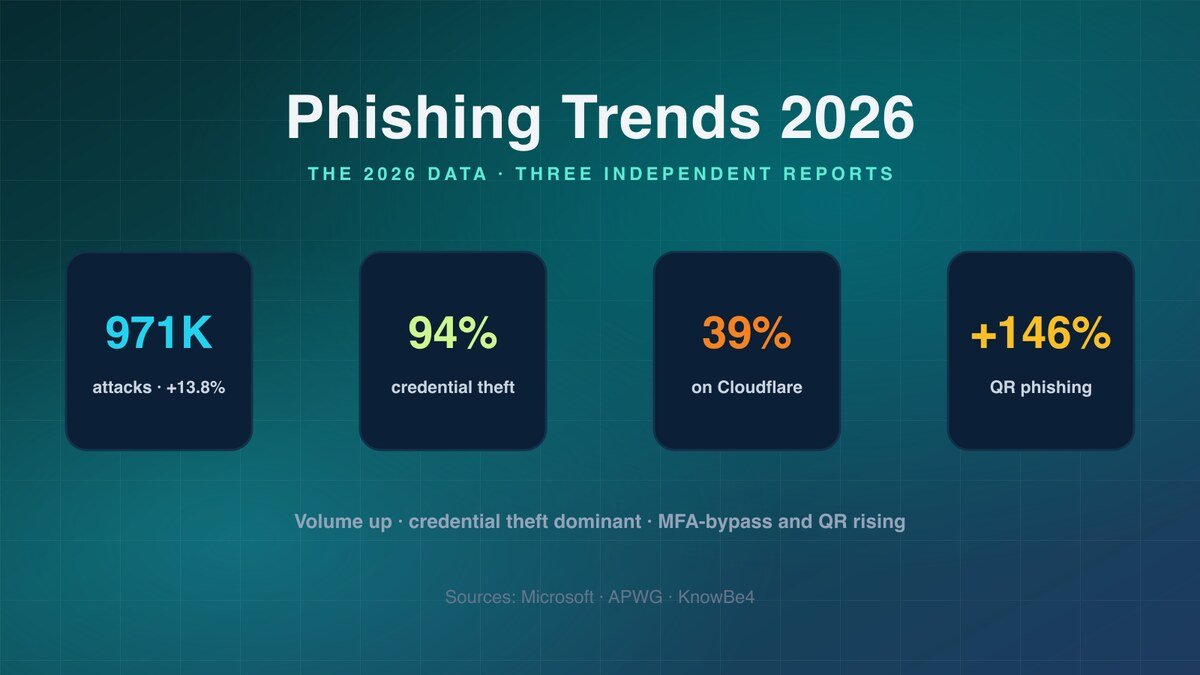
Cybersecurity experts currently know that phishing is not a dying tactic; it is evolving. Industry reports consistently show that over 80% of reported security incidents begin with a phishing attempt.
However, the execution has changed drastically. Observational findings show that generative AI has completely leveled the playing field for attackers who do not speak the target's language.
Early evidence indicates that AI allows attackers to craft perfectly written, hyper-personalized emails at scale. More research is needed, but current trends suggest this technology is increasing click-through rates rather than decreasing them.
Why This Happens
Phishing works because it exploits how the human brain processes information under stress.
Understanding types of hackers helps explain the "why." Opportunistic attackers use phishing because it requires almost zero technical skill compared to how hackers break into computers via software exploits.
Several root causes allow phishing to succeed:
- Cognitive Overload: People check emails and texts while distracted, commuting, or multitasking. They don't scrutinize the sender's address.
- Visual Spoofing: Attackers register domains that look almost identical to real ones (e.g., "support@paypaI.com" using a capital "i" instead of a lowercase "L").
- Manufactured Urgency: Phishing emails almost always claim your account will be locked, a payment failed, or an invoice is overdue. This panic shuts down critical thinking.
Why It Matters
Understanding this topic is crucial because phishing is usually just the front door. Once an attacker steals your email password, they can reset the passwords to your bank, social media, and crypto wallets.
Beginners get confused because they think having antivirus software makes them immune. Misinformation spreads when people believe only naive computer users fall for these scams. In reality, what is cybersecurity heavily emphasizes that even trained professionals get phished.
How to Understand and Stop Phishing
Step 1: Slow Down and Verify the Sender
Never trust the display name of an email. Always look at the actual email address behind it. If a message creates a sense of extreme urgency, take a 60-second pause before doing anything.
Step 2: Inspect Links Before Clicking
Hover your mouse over any link to see the actual destination URL. If it looks strange, don't click it. Instead, navigate to the website directly by typing the URL into your browser. How do hackers hack accounts almost always involves tricking users onto fake login pages.
Step 3: Enable Multi-Factor Authentication (MFA)
MFA is your safety net. If you accidentally type your password into a phishing site, the attacker still cannot log in without the code from your authenticator app or phone.
Common Mistakes
Mistake: Trusting an email because it has the company's official logo. Why it happens: Logos are easy to download and paste into fake emails. How to avoid it: Logos and branding do not verify legitimacy. Only the actual sender address and the URL matter.
Mistake: Assuming antivirus will block phishing links. Why it happens: People overestimate what endpoint security can do. How to avoid it: Antivirus helps, but attackers change their malicious URLs every few minutes to bypass filters. Human judgment is required.
Mistake: Ignoring text message phishing (Smishing). Why it happens: People are less suspicious of text messages than emails. How to avoid it: Can someone hack your phone just by texting you? Not directly, but text phishing is a massive threat. Never click links in unexpected texts about packages or bank alerts.
Factors That Affect Results
- Corporate Training: Organizations that run realistic, simulated phishing tests see significantly lower click rates among employees.
- Email Client Security: Modern email providers like Gmail and Outlook block millions of phishing emails daily, but some always slip through.
- Personal Stress Levels: Attackers time their campaigns around tax season, holidays, or major news events when people are distracted or anxious.
Comparison Table: Phishing vs. Technical Exploits
| Feature | Phishing (Social) | Technical Exploits |
|---|---|---|
| Target | Human psychology | Software/Hardware flaws |
| Skill Required | Very low (templates/AI do the work) | High (requires coding knowledge) |
| Cost to Attacker | Almost zero | High (buying zero-days is expensive) |
| Detection | Hard for automated tools | Easy for firewalls/antivirus |
| Prevention | User awareness and MFA | Patching and updating software |
What Current Evidence Suggests
| Tactic | Evidence Strength | Current Consensus |
|---|---|---|
| Mass Phishing | High | Relies on volume; low cost, low success rate per email, but high total yield. |
| Spear Phishing | High | Highly targeted; significantly higher success rate. |
| Business Email Compromise | High | Causes the highest financial losses; often bypasses standard filters. |
| Deepfake Voice/Video Phishing | Moderate | Emerging threat; currently used in high-value corporate scams. |
Pro Tips
- Use a password manager. Password managers will not auto-fill your credentials on a fake phishing website because the URL won't match the saved domain.
- Know the signs of a compromise. If you accidentally clicked a link and entered your details, knowing how to tell if your device has been hacked allows you to react quickly.
- Think like a defender. Organizations use professionals practicing what is ethical hacking to simulate phishing attacks and find weaknesses in their human firewall.
Safety / Best Practices
Follow reliable guidance from security professionals. Verify information through trusted resources.
Use comprehensive guides on how to protect yourself from hackers to build a layered defense. Understand the limitations of your tools—no spam filter will catch 100% of phishing attempts.
When phishing attacks succeed, the stolen data is often quickly moved to illicit markets. Directories like OnionLink catalog hidden sites where this data is traded. Staying informed about these threats through threat intelligence hubs like DarkStats helps you understand what attackers are currently after.
Related Guides
- Foundational Knowledge: Read our breakdown on what is cybersecurity to understand how phishing fits into broader defense strategies.
- Mobile Threats: If you receive suspicious text messages, our guide on can someone hack your phone explains mobile-specific phishing risks.
FAQ
Why doesn't spam filtering stop all phishing? Attackers use rapidly changing domains, compromised legitimate email accounts, and AI to craft emails that look identical to normal business correspondence. Filters catch the majority, but the sheer volume ensures some always reach inboxes.
Is phishing getting worse? Current evidence suggests it is getting more sophisticated, not necessarily more frequent. AI has removed the traditional "tells" like bad grammar, making it much harder for the average person to spot a fake email.
What happens if I click a phishing link but don't enter a password? Simply clicking a link can sometimes trigger a silent malware download, depending on your device's security settings. However, the primary goal is usually to get you to a fake login page. If you didn't enter data, the risk is lower, but you should still run a security scan.
Can MFA be bypassed by phishing? Yes, in some cases. Attackers use "adversary-in-the-middle" phishing sites that capture both your password and the real-time MFA code. This is why security keys (like YubiKey) are currently considered the gold standard for MFA.
Why do people still fall for fake emails? Phishing exploits cognitive biases. It creates artificial urgency and impersonates authority figures, which short-circuits the brain's critical thinking. When rushed or stressed, even highly intelligent people make snap judgments.
What is Business Email Compromise (BEC)? BEC is a highly profitable form of phishing where attackers impersonate executives or vendors to trick employees into wiring money or sending sensitive data. It often bypasses filters because it doesn't contain malicious links or attachments.
Key Takeaways
- Main takeaway: Phishing succeeds because it is easier to trick a human than to hack a firewall.
- Important limitation: No email filter or antivirus software can provide 100% protection against social engineering.
- Most common mistake: Trusting the display name of an email sender without verifying the actual email address.
- Best practice: Enable hardware-based MFA and never click direct links in urgent financial emails.
- Next step: Turn on Multi-Factor Authentication for your primary email account right now if you haven't already.
Conclusion
Phishing remains the most successful hacking method because it adapts faster than technology can block it. As long as humans are capable of feeling urgency, fear, or curiosity, attackers will use those emotions against them.
By understanding that phishing is a psychological attack rather than a technical one, you change the way you interact with your inbox. Remember that the threat landscape evolves constantly. To stay updated on the latest phishing campaigns and defense strategies, continue learning through trusted resources and related guides.