


PGP encryption is the standard method for securing digital messages, yet most people still send sensitive information through standard email without a second thought. This happens because standard email protocols were built for convenience, not privacy, leaving your messages exposed on servers. Learning how to use PGP solves this by putting you in control of your data. In this complete guide to PGP encryption, keys, and secure email, you will learn exactly how the system works, how to generate your first key pair, and how to send messages that only the intended recipient can read. We will also cover the practical tools needed to make end-to-end encryption part of your daily routine.
Quick Answer
PGP (Pretty Good Privacy) is an encryption program that secures email communication using a combination of symmetric and asymmetric cryptography. It works by using a public key to lock a message and a private key to unlock it, ensuring that only the intended recipient can read the contents, even if the email is intercepted.
What Is PGP?
PGP stands for Pretty Good Privacy. It is a data encryption and decryption program created in 1991 by Phil Zimmermann. The software provides cryptographic privacy and authentication for data communication.
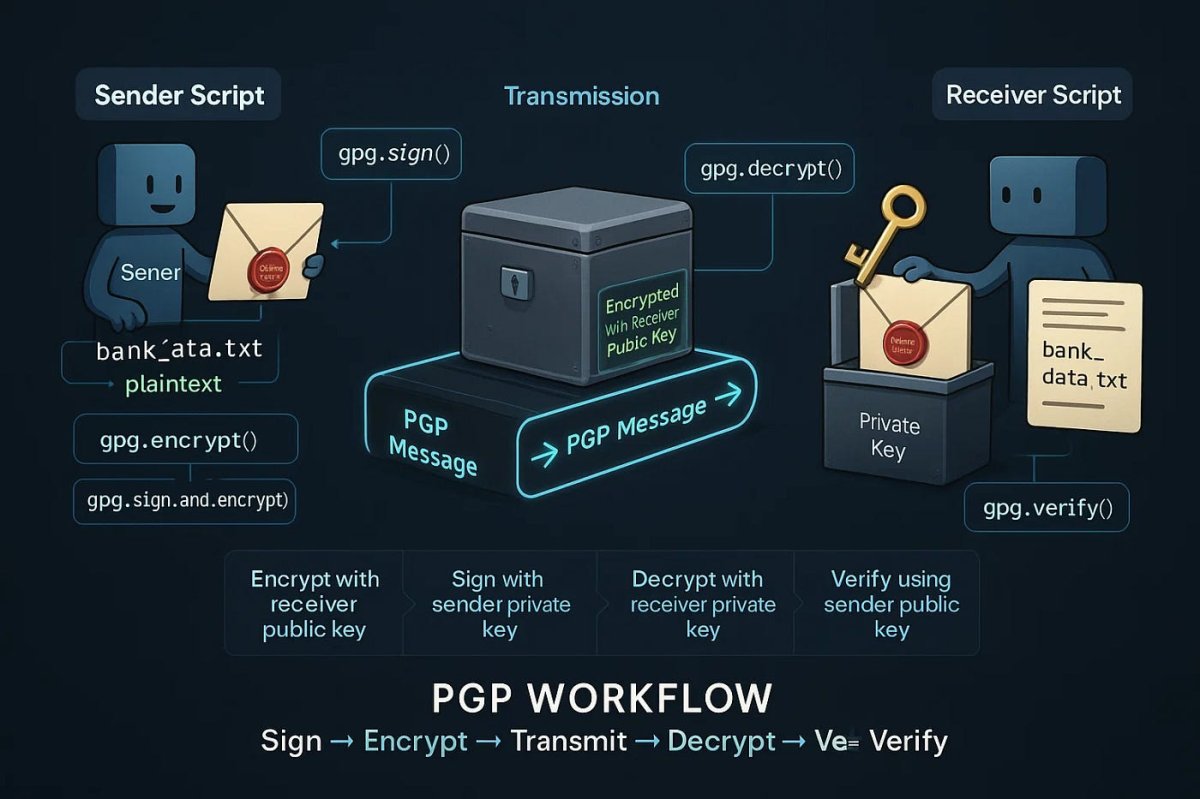
At its core, PGP is a hybrid cryptosystem. It combines the speed of symmetric encryption (where one key is used to both encrypt and decrypt) with the convenience of asymmetric encryption (where two linked keys are used). When you send a message, PGP generates a random session key to encrypt the text using a fast symmetric algorithm like AES. It then encrypts that session key using the recipient's public key. The recipient uses their private key to unlock the session key, which in turn unlocks the actual message.
People use PGP because it relies on open, heavily tested mathematical standards rather than keeping its code a secret. It allows individuals to communicate privately without relying on a central server or third-party company to hold their decryption keys. It is heavily utilized by journalists, privacy enthusiasts, and users communicating on hidden networks. For those understanding how the dark web works, PGP is essentially a mandatory survival tool for safe interaction.
Why Standard Email Fails
To understand why PGP is necessary, it helps to look at why standard email falls short of protecting your privacy.
Wrong habits
Treating email like a sealed letter rather than a postcard leads people to send passwords, financial details, and sensitive documents through unencrypted channels.
Outdated tools/info
Many businesses still rely on legacy email infrastructure designed in the 1980s, assuming that basic password protections are enough to stop modern snooping.
Misunderstanding system
Users often believe that logging into Gmail via HTTPS means their emails are encrypted, failing to realize that HTTPS only protects the data in transit between their browser and Google's servers, not the data at rest.
External limitations
Standard SMTP (Simple Mail Transfer Protocol) passes your message through multiple intermediary servers before reaching the destination, any of which can read or store the unencrypted text.
Essential PGP Tools and Software
To actually use PGP encryption, you need specific software. Here are the primary tools used today.
GPG4Win
What it is: A free, open-source implementation of the OpenPGP standard designed specifically for Microsoft Windows. Why it matters: It brings the power of command-line GnuPG to Windows users through a graphical interface called Kleopatra. Who uses it: Journalists, whistleblowers, and Windows-based privacy enthusiasts. Strengths: Integrates seamlessly with Outlook and Thunderbird; highly stable; backed by a German security organization. Limitations: The user interface feels dated and can be confusing for absolute beginners. Beginner suitability: Moderate. You will need to follow a tutorial, but the setup wizard helps.
Mailvelope
What it is: A browser extension for Chrome, Firefox, and Edge that adds PGP encryption directly to webmail interfaces like Gmail, Yahoo, and Outlook.com. Why it matters: It allows you to use PGP without installing a desktop email client. Who uses it: People who prefer webmail but want end-to-end encryption. Strengths: Extremely convenient; works within your existing email workflow; cross-platform. Limitations: Dependent on browser security; can occasionally clash with webmail UI updates. Beginner suitability: High. It is one of the easiest ways to start using PGP quickly.
Proton Mail
What it is: A Switzerland-based email service that integrates PGP encryption natively into its platform. Why it matters: It removes the need to manually manage keys if you are communicating with another Proton Mail user. Who uses it: Everyday users, activists, and businesses looking for a secure alternative to Gmail. Strengths: Zero-access encryption; handles PGP key exchange automatically between users; offers a free tier. Limitations: If you email someone outside the Proton ecosystem, they must use PGP manually or use a secure web link to read the message. Beginner suitability: Very high. It feels exactly like normal email but with built-in security.
PGP Tool Comparison
| Tool | Best For | Key Management | Ease of Use |
|---|---|---|---|
| GPG4Win | Desktop email clients (Outlook/Thunderbird) | Full local control | Moderate |
| Mailvelope | Webmail users (Gmail/Yahoo) | Local control via browser | High |
| Proton Mail | Seamless encrypted email | Handled automatically by the server | Very High |
The Complete Guide to PGP Encryption, Keys, and Secure Email
The title of this guide makes a specific promise to break down three distinct pillars of the PGP ecosystem. Here is a deep dive into each.
1. PGP Encryption
PGP encryption is the mathematical process that scrambles your readable text (plaintext) into an unreadable format (ciphertext). As mentioned earlier, it uses a hybrid system.
When you write an email, the PGP software first compresses the plaintext. Compression saves transmission time and strengthens the cryptographic security by reducing patterns in the text that hackers could exploit. Next, the software creates a random session key. This key uses a symmetric algorithm—typically AES-256—to encrypt the compressed data. Symmetric encryption is incredibly fast, making it ideal for the bulk of the data.
However, you cannot send this session key to the recipient securely because you do not share a secure channel yet. To solve this, PGP uses asymmetric encryption (like RSA or Elliptic Curve Cryptography). It takes the random session key and encrypts it using the recipient's public key. The encrypted session key and the encrypted message are then bundled together and sent. This dual-layer approach ensures that the heavy lifting is done quickly by symmetric encryption, while the secure key exchange is handled by asymmetric encryption.
2. PGP Keys
To participate in PGP encryption, you must generate a key pair. This pair consists of a public key and a private key. They are mathematically linked, but it is impossible to derive the private key from the public key.
Your public key is designed to be shared with the world. You can upload it to public key servers, put it on your website, or email it directly to contacts. When someone wants to send you an encrypted message, they fetch your public key and use it to lock the message. Think of it as an open padlock that you hand out to people; anyone can use it to lock a box, but only you can open it.
Your private key is the key to that padlock. It must be kept completely secret and secure, usually protected by a strong passphrase. If someone gains access to your private key and your passphrase, they can read all of your encrypted messages and impersonate you.
Keys also have a feature called digital signing. When you send an email, you can use your private key to "sign" it. The recipient uses your public key to verify that the signature matches. This proves the message actually came from you and was not altered in transit.
3. Secure Email
Secure email using PGP is about integrating these keys and encryption methods into your daily communication workflow. There are two main ways to format PGP in emails: PGP/MIME and Inline PGP.
PGP/MIME is the modern standard. It encrypts the entire message structure, including attachments and HTML formatting, into a single encrypted blob. Most modern PGP software defaults to this. Inline PGP is an older method where the encrypted text is pasted directly into the body of the email as a block of random characters. It breaks HTML formatting and does not support attachments well, but it is sometimes necessary when communicating with older systems.
To use secure email effectively, you must exchange public keys with your contacts. You then import their public key into your keyring (the database your PGP software uses to store keys). When you compose an email, you tell the software to encrypt it, and the software automatically selects the correct public key from your keyring based on the recipient's email address.
PGP vs. S/MIME: Key Differences
When exploring secure email, you will frequently encounter S/MIME (Secure/Multipurpose Internet Mail Extensions) as an alternative to PGP. While both aim to encrypt and sign emails, their underlying structures are completely different.
PGP relies on a decentralized "Web of Trust." You personally verify that a public key belongs to a specific person, usually by checking the fingerprint over a secondary channel. S/MIME relies on a centralized hierarchy. It requires a Certificate Authority (CA) to issue your digital certificate, much like an SSL certificate for a website.
For most individuals, PGP is preferred because it is free, open-source, and does not require paying a third-party authority. S/MIME is heavily used in enterprise environments because IT administrators can centrally issue and revoke employee certificates through their own internal CA.
| Feature | PGP | S/MIME |
|---|---|---|
| Trust Model | Decentralized (Web of Trust) | Centralized (Certificate Authorities) |
| Cost | Free | Often requires paid certificates |
| Ease of Setup | Manual key generation and exchange | Often automated by corporate IT |
| Best For | Individuals, journalists, privacy advocates | Large enterprises, corporate compliance |
End-to-End Encryption vs. Transport Layer Security
A major point of confusion for beginners is the difference between PGP (End-to-End Encryption) and TLS (Transport Layer Security, the technology behind HTTPS). Understanding this difference is critical.
TLS encrypts your data in transit. When you send an email from your phone to Gmail's servers, TLS protects it from someone snooping on your local Wi-Fi network. However, once the data arrives on Google's servers, it is decrypted and stored in plain text so Google can index it for search or run spam filters.
PGP provides End-to-End Encryption (E2EE). The data is encrypted on your device before it ever leaves your computer. It travels across the internet fully encrypted, and it sits on Google's servers fully encrypted. It is only decrypted on the recipient's device.
It is also important to note that PGP only protects the contents of the email, not the connection itself. If you want to understand how PGP differs from using a VPN, the distinction lies in the fact that a VPN hides your IP address and encrypts your entire web traffic, whereas PGP encrypts a specific message payload.
| Characteristic | TLS (HTTPS) | PGP (E2EE) |
|---|---|---|
| Where it decrypts | On the server | On the recipient's device |
| Protects against | Hackers on your local network | Hackers, server admins, governments |
| Requires key exchange? | Handled automatically by browsers | Yes, manual public key sharing |
How to Set Up and Improve Your PGP Security
Getting started with PGP requires a methodical approach to ensure your keys are generated safely and used correctly.
First: Foundation setup
Begin by downloading a PGP client like GPG4Win or installing the Mailvelope extension. Generate your primary key pair using a strong, unique passphrase of at least 20 characters. Once generated, back up your private key and your revocation certificate to an encrypted USB drive. Store this drive in a safe, physical location. If you lose your private key without a backup, you will permanently lose access to all future messages sent to you.
Next: Fix mistakes and habits
A common mistake beginners make is publishing their public key but forgetting to sign it with other trusted keys, making it hard for people to verify its authenticity. Get at least one trusted friend or colleague to sign your key. Additionally, stop sending unencrypted emails to people whose public keys you already have. Force yourself to use the "encrypt" button every single time you compose a message to a key holder.
Finally: Improve system/tools/strategy
Advanced users improve their security by creating subkeys. Instead of using your master key for daily encryption and signing, you create separate subkeys for these tasks. You can then move your master key completely offline to an air-gapped computer or a secure hardware token. If your laptop is compromised, the attacker only gets your daily-use subkeys, which you can easily revoke and replace without losing your established identity and network of trust.
Common Problems & Fixes
Problem:
You receive an encrypted message from a contact, but your PGP software throws an error saying "No matching private key found," and you cannot read the message.
Fix:
This happens when the sender encrypted the message to an old or expired public key of yours that is no longer in your keyring, or they accidentally encrypted it to their own key. Ask the sender to re-encrypt the message using your current, updated public key, which you can resend to them.
Problem:
You send a digitally signed email, but the recipient's email client displays a red warning saying the signature is invalid or unverified.
Fix:
This usually occurs because you are using Inline PGP formatting, and the recipient's email client altered the line breaks or encoding of the message during transit, breaking the signature. Switch your PGP client settings to send signatures using PGP/MIME instead of Inline PGP.
Problem:
You forgot the passphrase to your private key, locking you out of your encrypted emails.
Fix:
There is no "forgot password" button in PGP. If you have a backup of your revocation certificate (which you should have made during setup), you must revoke the compromised key pair, generate a completely new key pair, and ask all your contacts to delete your old public key and start using the new one.
Pro Tips
1. Use a Hardware Security Key For maximum security, store your PGP private key on a hardware token like a YubiKey. The cryptographic operations happen entirely on the physical device, meaning malware on your computer cannot extract your private key.
2. Set Up a Web Key Directory (WKD) Instead of asking contacts to search public key servers, set up a WKD on your domain. This allows someone to simply type your email address into their PGP client, and the software will automatically fetch your public key over a secure HTTPS connection.
3. Separate Work and Personal Keys Never use the same PGP key pair for your corporate job and your personal life. If you leave your job or your work laptop is seized, you do not want your personal encrypted communications to be tied to that single key.
4. Expire Your Keys Annually Set your public keys to expire after one year. This is not a security flaw; it is a safety mechanism. If you lose access to your private key, the key will eventually become useless to anyone who finds it. You can simply extend the expiration date as long as you still have control of it.
5. Enable Autocrypt on Mobile If you use PGP on a mobile device like K-9 Mail with OpenKeychain, enable the Autocrypt setting. It automates the key exchange process by attaching your public key to every standard email you send, making it frictionless for non-technical contacts.
How PGP Fits Into a Broader Privacy Strategy
PGP is incredibly effective for securing email, but email is only one part of your digital footprint. To achieve comprehensive privacy, PGP should be combined with other tools. For example, even if your email contents are encrypted, your internet service provider can still see that you are connecting to an email server. Routing your traffic through a secure tunnel requires understanding how Tor and VPNs compare so you can choose the right tool to hide your IP address and obscure the fact that you are sending emails at all. Similarly, because PGP requires managing long passphrases, utilizing a dedicated password manager tool ensures you never lose access to your keys while keeping them safe from brute-force attacks.
Safety & Best Practices
PGP is a robust tool, but it is not a magic bullet. The most significant limitation of PGP encrypted email is metadata. While the contents of your message are completely scrambled, the subject line, sender, recipient, timestamp, and IP address of the sending server are still visible in plain text. Anyone monitoring the network can see that you communicated with a specific person at a specific time, even if they cannot read what you said.
This metadata vulnerability means that even encrypted emails can be used to build a profile of your contacts and habits. Attackers and state-sponsored actors use modern tracking methods to analyze these communication patterns, proving that encryption alone does not guarantee total anonymity.
Additionally, standard PGP does not provide forward secrecy. If an attacker records your encrypted traffic today and somehow obtains your private key ten years from now, they can decrypt those old messages.
Responsible usage also means verifying public keys out-of-band. If you receive a public key from a colleague over email, how do you know a hacker didn't intercept it and replace it with their own? You should verify the "fingerprint" (a unique alphanumeric string identifying the key) by reading it out loud over a phone call or in person. Attackers know that users struggle with this verification process and often deploy sophisticated phishing attacks to trick users into encrypting sensitive messages to an attacker's public key instead of the intended recipient's.
Related Guides
- [Beginner Setup Guide for End-to-End Encryption]
- [Common Problems with PGP and How to Solve Them]
- [Best Tools for Anonymous Browsing and Privacy]
- [How to Secure Your Email Account from Hackers]
FAQ
Is PGP encryption completely unbreakable? No encryption is theoretically unbreakable, but PGP using AES-256 and RSA-4096 is practically unbreakable with current computing power. Vulnerabilities usually come from user error, such as weak passphrases or failing to verify public keys.
Can I use PGP on my smartphone? Yes, you can use PGP on mobile devices. Apps like OpenKeychain (for Android) allow you to manage keys, and email clients like K-9 Mail integrate with it to send and receive encrypted messages on the go.
What happens if I lose my PGP private key? If you lose your private key and do not have a backup, you cannot decrypt any future messages sent to you. You will need to generate a new key pair, distribute the new public key, and ask contacts to stop using the old one.
Do both the sender and receiver need PGP for it to work? Yes, to send an encrypted message, the sender must have the receiver's public key. However, the sender does not strictly need their own key pair unless they want to digitally sign the message so the receiver can verify their identity.
Is PGP legal to use? Yes, in almost all democratic countries, using PGP is completely legal. However, some authoritarian nations restrict or ban the use of strong encryption, so you should always check local laws if you are traveling or residing abroad.
Can PGP encrypt file attachments, not just text? Yes, when using the PGP/MIME standard, your software will encrypt the entire email package, including any file attachments. You can also manually encrypt individual files using your PGP software before sending them.
Conclusion
Standard email leaves your private conversations exposed to servers, hackers, and third-party snoops. PGP solves this by giving you mathematical control over your data through public and private keys. By understanding how PGP encryption works, managing your key pair securely, and integrating the system into your email workflow, you can communicate with absolute privacy. The system requires a slight shift in habits, but the trade-off is complete control over who can read your messages.