
If you're dealing with anxiety about browsing the dark web, you're not alone. This is a common issue, and it often happens because people misunderstand the difference between a platform's technical security and a user's personal operational security. Many beginners struggle due to outdated information, relying on unreliable sources, or overestimating the protection provided by the Tor browser.
In this guide, you'll learn:
- what "is Dread Forum safe" actually means in practice
- why the risks exist despite the platform's secure design
- what current threat intelligence says about forum monitoring
- practical ways to browse without compromising your identity
- common mistakes that lead to compromised accounts
Quick Answer
Dread Forum itself is not known to distribute malware or intentionally collect users' private data. However, using Dread still carries significant risks because of phishing sites, scams, malicious users, and potential legal or privacy consequences depending on how you interact with the platform. Safe use depends far more on your operational security than on the forum itself.
Evidence Snapshot
| Topic | Current Evidence |
|---|---|
| Platform security | There are no publicly documented major server-side breaches of Dread's infrastructure since its creation in 2018. |
| Law enforcement monitoring | Law enforcement agencies have repeatedly used information from dark web forums during investigations, although the extent of routine monitoring is not publicly known. |
| Phishing prevalence | Threat intelligence reports consistently show fake dark web links are a primary vector for user compromise. |
| Operational history | The forum has been active for 7+ years with a well-documented history of severe, prolonged DDoS attacks. |
| Malware distribution | Current evidence suggests malware is rarely hosted directly on the text-only forum, but is frequently linked in user posts. |
What Is "Is Dread Forum Safe"?
When people ask if Dread Forum is safe, they are usually asking two different things. First, will the website hack my computer? Second, will I get in trouble or scammed for using it?
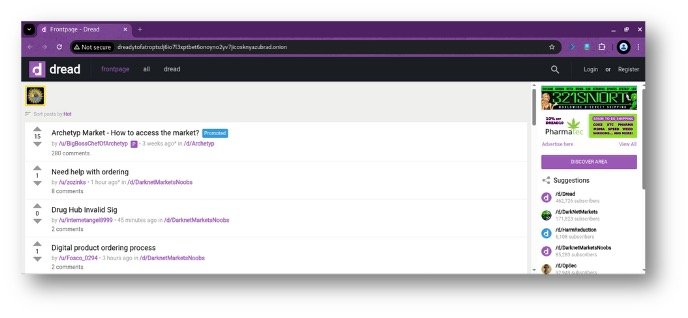
Dread Forum is a Tor-based discussion forum that functions similarly to Reddit and is widely used for discussions related to darknet markets, cybersecurity, privacy, and anonymous communication.
From a technical standpoint, the site is designed to be secure. It uses no JavaScript, collects no standard user data, and relies entirely on PGP cryptography for account logins. However, safety on Dread is heavily dependent on the user. Beginners often research what is Dread Forum expecting a standard website, but the real danger lies in how you interact with the surrounding ecosystem.
Current Research or Industry Status
Security experts and threat intelligence analysts currently view Dread as a primary open-source intelligence (OSINT) target. Established facts show that information posted on public dark web forums is routinely captured and analyzed by government agencies and private security firms.
However, significant uncertainties remain regarding advanced de-anonymization techniques. Current developments in 2026 suggest that while standard Tor traffic remains highly resistant to tracking, state-sponsored actors may possess capabilities to exploit browser-level vulnerabilities. The consensus among experts is that the platform itself is secure, but active participation carries inherent legal and privacy risks.
Why This Happens
Understanding why users get compromised requires looking at the root causes, which almost always stem from user error rather than platform failures.
Wrong assumptions
Many beginners assume the Tor browser makes them entirely invisible. This false sense of security leads them to reuse usernames or discuss personal details, completely breaking their anonymity.
Outdated information
Users often search for Dread links on the clearnet. Because search engines do not index .onion sites, they find outdated links or deliberate phishing clones instead.
Technical limitations
While Tor is secure, the underlying operating system (like Windows) can still leak data through background processes if not configured correctly.
Environmental factors
Dread is a high-value target. Because it controls the reputation of major darknet markets, competing scammers constantly target its users with highly convincing social engineering campaigns.
Why It Matters
Understanding these risks is crucial because the consequences of a mistake on Dread are not just a deleted account.
If you fall for a phishing link, attackers can steal your PGP keys, potentially unlocking your encrypted emails or cryptocurrency wallets across the dark web. If you fail to hide your IP address before opening the Tor browser, your internet service provider can see you accessing Tor, which may flag you for additional surveillance.
Beginners often get confused because the platform looks benign—just text on a screen. Misinformation spreads easily because seasoned users rarely discuss their security setups openly, leaving newcomers to figure it out through trial and error.
How to Solve or Understand the Topic
To browse safely, you must shift your focus from trusting the platform to trusting your own setup. Follow this strict workflow:
Text-Based Infographic: The Safe Browsing Workflow
text
Step 1: Verify Onion Link
└─> Use a trusted source (like DarkStats) to find the current, valid .onion URL.
Step 2: Open Tor Browser
└─> Ensure you are using the official Tor Browser, set to "Safest" security level.
Step 3: Access the Forum
└─> Navigate to the verified URL. Never use clearnet proxies (e.g., .com, .to).
Step 4: Read Only
└─> Reading without interacting generally carries lower risk than posting or
downloading content, though no activity on the internet is entirely risk-free.
Step 5: Never Download Files
└─> Ignore all external links and file downloads. They are almost always malware.
Step 6: Never Use Mirrors
└─> If the site is down due to DDoS attacks, be patient. Fake mirrors are traps.
Common Mistakes
Mistake: Using a clearnet proxy
Why it happens: Users want faster speeds and find sites like dread.cc or dread.to on Google. How to avoid it: These are run by unknown third parties who can log your IP address and steal your PGP login signature. Only use the official .onion address.
Mistake: Reusing a clearnet username
Why it happens: It is easier to remember a username you already use on Reddit or Twitter. How to avoid it: Create a completely random pseudonym for Dread. Linking your dark web persona to your real-world social media instantly destroys your anonymity.
Mistake: Logging in without PGP verification
Why it happens: Beginners sometimes find third-party tools that claim to log you in via a standard password. How to avoid it: If you are not signing a cryptographic challenge with your private PGP key, you are not on the real Dread.
Factors That Affect Results
Several variables determine how safe your experience will be:
- Operating system: Tails OS is highly secure; Windows is more vulnerable to background data leaks.
- Browser settings: Using the "Safest" security level in Tor disables all scripts, preventing most attacks.
- Account activity: Lurking carries lower risk; posting and arguing with users increases your digital footprint and draws attention.
Comparison Tables
Dread Safety: Pros & Cons
| Pros | Cons |
|---|---|
| No JavaScript by default (reduces malware risk) | High volume of fake mirror sites |
| Uses PGP authentication (no passwords to steal) | Constant, sophisticated phishing attempts |
| Large, active community for scam warnings | Heavy law enforcement interest and monitoring |
| Useful for legitimate cybersecurity OSINT | Frequent illegal content discussions |
Safe vs. Risky Behavior
| Behavior | Risk Level | Why |
|---|---|---|
| Reading text posts on verified .onion | Lower | No code execution, standard Tor encryption |
| Posting with a PGP-verified account | Medium | Safe if OPSEC is perfect, but creates a digital trail |
| Clicking an external link to a market | High | Links can be hijacked or lead to phishing sites |
| Downloading a file linked in a post | Extreme | Files are almost always malware or deanonymization tools |
What Current Evidence Suggests
| Topic | Evidence Strength |
|---|---|
| Platform itself stealing data | Very Weak (No publicly documented cases) |
| Phishing links causing compromise | Strong (Constantly documented by community moderators) |
| Law enforcement tracking Dread users | Strong (Confirmed via multiple international court documents) |
| Malware infections from just browsing | Weak (Due to lack of JavaScript/images on the forum) |
| PGP key theft via the site | Very Weak (Site architecture does not handle private keys) |
Pro Tips
- Check PGP fingerprints manually: If a well-known vendor or admin posts an update, do not trust the username alone. Check their posted PGP fingerprint against a previously known, trusted version to ensure they haven't been impersonated.
- Evaluate the VPN + Tor decision carefully: A VPN can hide Tor usage from your ISP, but it does not make Tor inherently more anonymous. Whether it improves privacy depends on your specific threat model. For a standard user, Tor alone is often sufficient.
- Ignore "official" mirrors: There is no such thing as an official Dread mirror. If the main site is down due to DDoS attacks, wait. Any site claiming to be a backup is a trap.
Safety / Best Practices
Follow reliable guidance from established privacy advocates. Verify all information through multiple trusted sources before implementing complex security setups. Understand the limitations of your tools; Tor protects your network traffic, but it cannot stop you from making social engineering mistakes. Avoid unsupported claims from users on Dread who promise "foolproof" anonymity methods. Your safety depends entirely on your discipline and consistency.
Related Guides
- What Is Dread Forum? Complete Guide to the Dark Web's Largest Discussion Forum
- DarkStats Homepage: Monitor Dark Web Exposure
- How to Set Up PGP Encryption for Beginners
- Tails OS Setup Guide for Anonymous Browsing
FAQ
Is Dread illegal? Simply browsing Dread is not illegal in most countries, as it is just a text-based discussion forum. However, using it to coordinate or facilitate illegal activities is a crime. Because illicit discussions happen openly on the platform, accessing it may attract unwanted scrutiny depending on your local laws.
Can you access Dread without Tor? No. Dread is hosted exclusively as a .onion hidden service, which is a protocol only handled by the Tor network. Standard browsers like Chrome, Safari, or Firefox cannot resolve or connect to the site.
Is Dread safe on Windows? Dread can be accessed on Windows using the Tor browser, but Windows is generally considered less safe for dark web browsing. Windows has background processes that can leak data or compromise your IP address. Security experts recommend using a privacy-focused OS like Tails instead.
Does Dread log IP addresses? Based on the platform's design and community auditing, there are no indications that Dread logs IP addresses. Because it operates as a Tor hidden service, the server only sees the IP address of the Tor exit node, not your real IP address.
Can your ISP see you use Dread? Your ISP cannot see that you are visiting Dread specifically. However, they can see that you are connecting to the Tor network. If this is a concern, you may need to evaluate whether a VPN fits your threat model to hide your Tor usage from your ISP.
Is Dread better than Reddit for privacy? From a technical standpoint, yes. Dread collects zero metadata, requires no email or phone number, and routes all traffic through Tor. Reddit tracks your IP address, browsing habits, and requires identifiable information to create an account.
Is Dread down? Dread goes offline frequently due to massive DDoS attacks and server maintenance. If you cannot access the site, it does not necessarily mean it has been seized. Check trusted dark web intelligence platforms to verify its current status. Never use alternative mirror sites during these times.
Can law enforcement track me on Dread? Law enforcement cannot easily track you through the Tor network itself, but they can track you if you make operational security mistakes. Reusing usernames, posting personal details, or accessing the forum without proper isolation can expose your real identity.
Key Takeaways
- Main takeaway: Dread Forum is technically secure, but the environment around it is highly dangerous due to phishing and social engineering.
- Important limitation: The Tor browser only protects your network traffic; it cannot protect you from your own mistakes or downloading malicious files.
- Most common mistake: Using clearnet proxy sites instead of the official .onion address.
- Best practice: Only access the verified .onion link via the Tor browser on a secure operating system, and never download files.
- Current evidence: There are no publicly documented major server-side breaches, meaning user error remains the leading cause of compromise on dark web forums.
- Next step: Verify the current, legitimate Dread URL using a trusted intelligence platform before attempting to visit.
Conclusion
Asking if Dread Forum is safe requires shifting your focus from the platform's code to your own behavior. The site itself is a well-built, secure environment that is not known to actively exploit its users. The real danger lies in the sophisticated scams that prey on beginners who do not understand operational security. By avoiding clearnet proxies, refusing to download files, and maintaining strict separation between your real identity and your dark web persona, you can browse the forum with a much lower risk profile. To understand the platform's layout and features before you visit, read our complete breakdown of what is Dread Forum.